> For the complete documentation index, see [llms.txt](https://help.orbe.app/llms.txt). Markdown versions of documentation pages are available by appending `.md` to page URLs; this page is available as [Markdown](https://help.orbe.app/settings/geolocation.md).
# Geolocation
In any Orbe paid plan, you can configure **advanced geolocation behaviors** beyond the default settings. This tutorial explains the available geolocation options, allowing each brand to tailor them to their specific needs.
{% hint style="info" %}
All these settings are compatible with [Share Settings](https://help.orbe.app/general/connect-stores/settings#shared-settings). If you have connected stores and you enable it, all the configuration will sync across all of them automatically.
{% endhint %}
## When a customer visits for the first time
{% hint style="warning" %}
This setting is only available on **paid** plans.
{% endhint %}
This setting enables you to customize **Orbe's behavior when a customer visits your store for the first time**.
### Show always on the first visit regardless of the user's location
This is the default option. It functions as a welcome popup that appears to **all customers on their initial visit**, prompting them to select their preferred experience.
{% hint style="info" %}
**Example**
If a user visits the Spanish experience from Spain, the popup will appear, allowing the user to confirm their preferences.
{% endhint %}
This option is highly recommended for customers using the [**Klaviyo integration**](/general/integrations/klaviyo.md), as it enables Orbe to save country and language preferences and send them to Klaviyo for personalized email marketing campaigns.
### Show only when the user is in the incorrect experience
This option ensures that the geolocation popup is displayed **only when the user is in the wrong shopping experience**. When an international user visits an incorrect shopping experience, Orbe will recommend redirecting them to their localized experience.
{% hint style="info" %}
**Example**
When a US user visits the US experience, Orbe will not bother the user since they are in the correct localized experience.
When a French user visits the US experience, the Orbe popup will appear, recommending the French experience.
{% endhint %}
We recommend using this option if you want to show the welcome popup only for your international customers.
## When a customer comes back
This setting allows you to configure **Orbe's behavior on the second and subsequent visits** of a customer when they are in the incorrect experience.
### Redirect only if the current country and preference match
This option (enabled by default) only redirects users when their **current location matches the country they previously selected**.
If the user is now in a different country, Orbe won’t force a redirect or show the popup again.
{% hint style="info" %}
**Example**
* **Store they are browsing:** United States
* **Country selected on first visit:** United Kingdom
* **Current location:** Spain
Because the user’s current location (Spain) doesn’t match their saved preference (United Kingdom), Orbe does nothing. The user keeps browsing the **US store** without interruption.
{% endhint %}
### Always redirect based on country preference
With this option, Orbe **always redirects users to the country they previously selected**, no matter where they are located.
Once a user chooses a country, Orbe treats that choice as the source of truth.
{% hint style="info" %}
**Example**
* **Store they are browsing:** United States
* **Country selected on first visit:** United Kingdom
* **Current location:** Spain
Orbe ignores the user’s current location and redirects them to the **UK store** every time.
{% endhint %}
## Language selector behavior
{% hint style="warning" %}
This setting is only available on **paid** plans.
{% endhint %}
This setting allows you to configure **how you want a default language to be suggested** in the language selector.
### Defaultly suggest the user's browser language
This is the default and recommended option, as users typically set their browsers to their preferred language or a language they are comfortable with. Therefore, if the language of their browser is available, it is advisable to suggest that language. Otherwise, the default language configured in Shopify Markets for the respective country will be recommended.
### Defaultly suggest the language configured for each market in the settings of Shopify Markets
With this option, Orbe will suggest the default language you’ve set for each market in Shopify Markets. That means visitors will automatically see the language you’ve defined for the market they’re browsing (even if it doesn’t match their browser’s language).
## Language Settings
{% hint style="warning" %}
This setting is only available on **paid** plans.
{% endhint %}
Sometimes users reach the correct shopping experience but still **see the store in a language that doesn’t match their preferences**. This often happens in places like Canada, where different regions use English or French, or when users are living abroad, traveling, or browsing from a temporary location. In these situations, customers may receive the right prices, products, and currency for their location, yet the store may not appear in their preferred language, even when that language is available.
Orbe allows you to configure how language should be suggested in these situations, with multiple behavior options that can work together.
### Show Orbe if the user is in the correct experience but not using their browser language
This option triggers the popup when a user is in the correct country, experiencing accurate pricing, product availability, and currency settings. If they are not browsing the store in their preferred language based on their browser settings, the system will recommend switching to their preferred language.
### Automatically redirect if they're in the right store for their country but browsing in a different language than their preferred one
When this option is enabled, Orbe remembers the language a visitor selected. If they are in the correct country storefront but arrive in a different available language, Orbe automatically takes them back to their selected language.
For example, a visitor selects French in a Canadian storefront where English is the default language. If they later land on the English version of that Canadian storefront, Orbe sends them back to the French version automatically.
{% hint style="info" %}
For the most reliable setup, use [Overview](/selectors/overview.md). If you use your theme's own language selector instead, [Integrate your selector](/developer-reference/integrate-your-selector.md) so Orbe can save each visitor's language preference.
{% endhint %}
## Popups Display Order
{% hint style="warning" %}
This setting is available on **Orbe paid** plans.
{% endhint %}
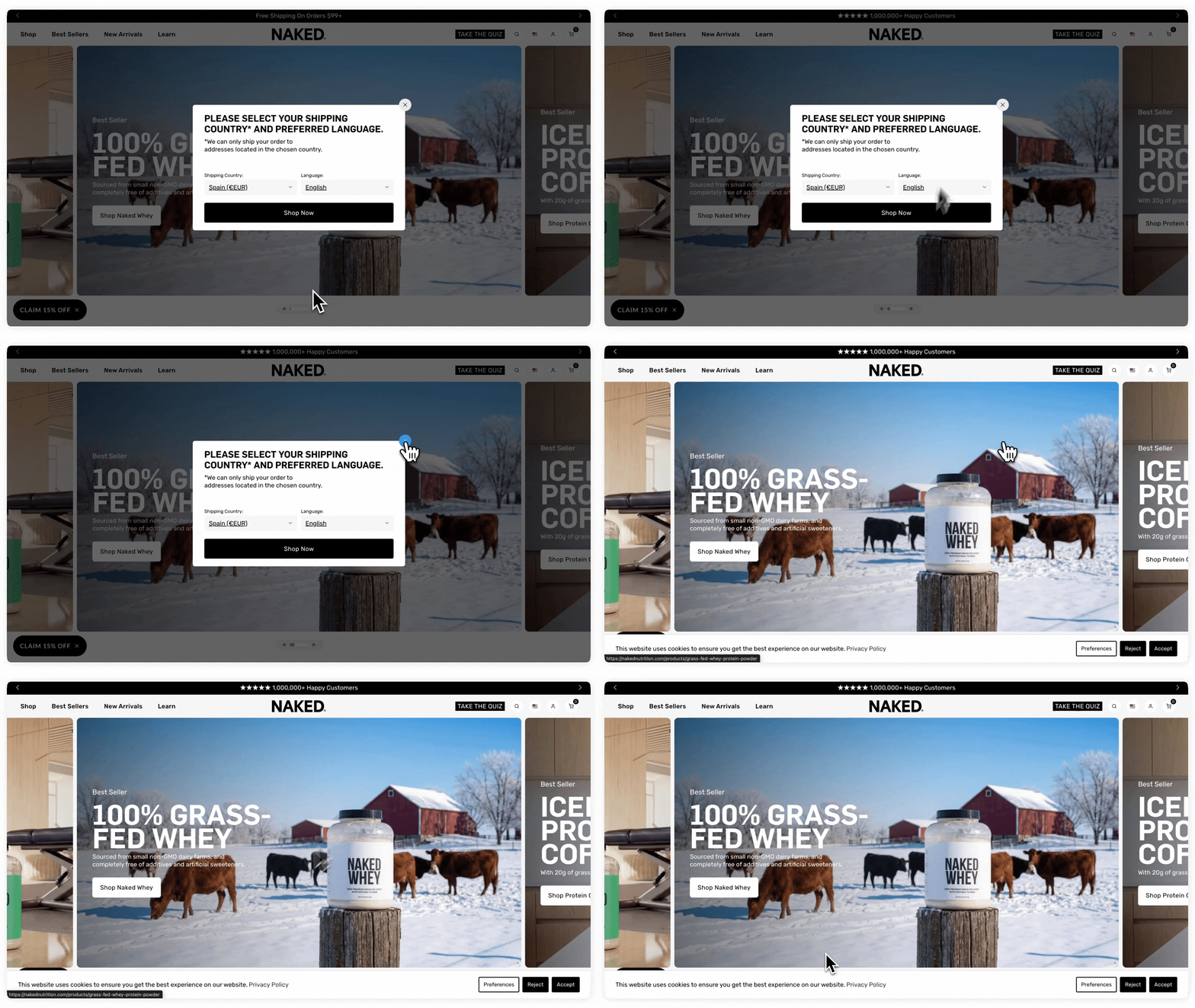
The **Popups display order** setting controls when the Geolocation popup appears in relation to other banners and popups on your store (such as cookie consent banners).
You can find this setting in **Settings →** [**Geolocation**](https://admin.shopify.com/apps/300c7396da3de51b6c2a5df448979f2a/settings/geolocation)
{% embed url="" %}
{% hint style="info" %}
Keep in mind that **Orbe is not a cookie management tool**. Its Geolocation popup serves a different purpose: helping visitors understand which market they're browsing before anything else loads. This setting simply gives you control over the order in which popups appear (there's no wrong choice, it's purely a matter of user experience).
{% endhint %}
### No specific behaviour option
This is the default option. With it, **the Geolocation popup appears without a specific order,** whichever loads first will show first. This works fine if you don't have other popups on your store, or if you don't mind them appearing at the same time.
If you want it to show after your cookie banner, you'll need to configure that directly in your cookie management app.
### Show before other popup option
**The Geolocation popup appears before any other popups or banners on your store**. This is useful if, for example, you want visitors to select their country before they see a cookie consent banner or a promotional popup.
When you select this option, you'll need to add the CSS classes or IDs of the popups you want to delay; this tells Orbe which banners to hold back until the visitor has interacted with the Geolocation popup.\
\
For example, if you're using the official cookie banners from Shopify, you'd add `#shopify-pc__banner`.
## Preferences duration
Preferences duration lets you decide **how long Orbe should remember a visitor’s choice** before showing the geolocation popup again.
This gives you full control over **how often visitors are asked to confirm their country or language again**. It’s a simple way to ensure the popup appears **when it makes sense**, and stays out of the way when it doesn’t.
{% hint style="warning" %}
This setting is available on **Orbe Plus** and **Enterprise** plans.
{% endhint %}
### After visitor closes popup
Use this option to decide how long the popup stays hidden when a visitor **closes it without selecting anything**.
You can choose a number of days (minimum: 1, default: 7). During that time, the popup won’t appear again.
{% hint style="info" %}
**Example**
If you set this to **3 days**, a visitor who closes the popup will not see it again for the next 3 days, even if they return multiple times. On day 4, the popup appears again so they can confirm their location.
{% endhint %}
#### **Hide the popup only for the current browser session**
{% hint style="success" %}
**Recommended for most stores.** We recommend this option to guarantee the best overall geolocation experience.
{% endhint %}
With this option, the popup stays hidden **only while the current browser session is active**.
Once the visitor closes their browser, the session resets and the popup will appear again on their next visit. It’s an easy way to hide the popup temporarily without choosing a fixed number of days.
{% hint style="info" %}
**Example**
A visitor closes the popup and keeps browsing your store. As long as they keep the same browser session open, the popup stays hidden. If they close their browser at night and return the next morning, the session resets and the popup will appear again immediately.
{% endhint %}
### **After visitor selects country and language**
Adjust this setting to control **how long Orbe keeps a visitor’s confirmed country and language** before asking again. It’s useful when you want to double-check that the shopper is still in the right store and their context hasn’t changed.
During this time, Orbe uses those preferences to **automatically guide visitors to the right storefront** without showing the popup again.
By default, Orbe remembers the selection for **60 days**, but you can shorten this period if you want to reconfirm preferences more often and give visitors the chance to choose again.
{% hint style="info" %}
**Example**
If you set this to **15 days**, Orbe will use the visitor’s selected country and language to automatically guide them to the right store for the next 15 days, without showing the popup again.
On day 16, the popup appears again so the visitor can confirm or update their preferences if their situation has changed.
{% endhint %}
## **Exclude IPs from the Welcome Popup**
If your team regularly tests different country experiences on your store, you **can exclude specific IPs so the welcome popup doesn't appear during internal testing**, and those visits won't count in your geolocation metrics either.
{% hint style="warning" %}
This setting is available on **Orbe paid** plans.
{% endhint %}
**How it works**
Go to your Geolocation settings and add the IPs you want to exclude. Any visit from those IPs won't show the Welcome Popup, and won't be counted in your redirect metrics. This only affects the Welcome Popup: your Country Selector and Language Selector will keep working as usual for those IPs.
Your own IP is shown automatically in that same setting, so you don't need to look it up elsewhere.
---
# Agent Instructions
This documentation is published with GitBook. GitBook is the documentation platform designed so that both humans and AI agents can read, navigate, and reason over technical content effectively. Learn more at gitbook.com.
## Querying This Documentation
If you need additional information that is not directly available in this page, you can query the documentation by asking a question.
Perform an HTTP GET request on the following URL with the `ask` and `goal` query parameters:
```
GET https://help.orbe.app/settings/geolocation.md?ask=&goal=
```
`ask` is the immediate question: it should be specific, self-contained, and written in natural language.
`goal` is what the user is ultimately trying to achieve, the reason they need the answer. Sharing it helps GitBook give you a better, more relevant answer. A goal is most helpful when it describes the outcome the user wants rather than restating the question. For example, with `ask=how do I create an API token`, a goal like `automate deployments from our CI pipeline` lets GitBook tailor the answer to that use case.
The response will contain a direct answer to the question and relevant excerpts and sources from the documentation.
Use this mechanism when the answer is not explicitly present in the current page, you need clarification or additional context, or you want to retrieve related documentation sections.